

Importing sessions from a CSV file
In MobaXterm you can import a list of sessions using a CSV file.
The import wizard is available from a right click on Users sessions > Import sessions from third-party programs in the sessions panel:
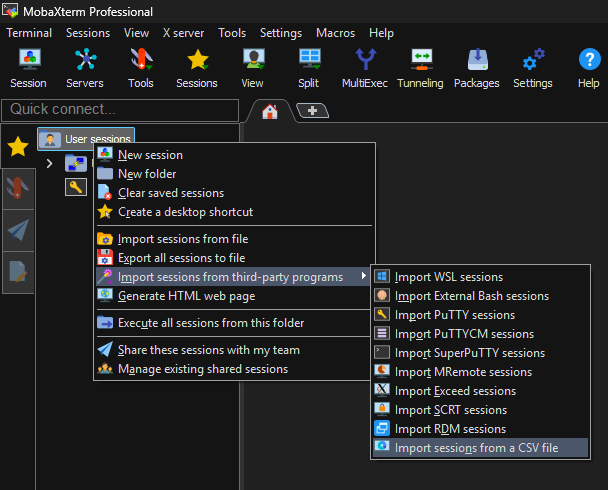
Here is an example of the format to use in the CSV file:
Session type,Remote Host,Username,Port
SSH,host1,user1,port1
SSH,host2,user2,port2
Here is a list of the available options to use in the CSV file:
- Folder name
- Session name
- Session type
- Hostname
- Username
- Port number
- Key file
- Command
- Proxy type
- Proxy host
- Proxy user
- Proxy port
- Proxy cmd
- Key Cert
- Host Cert
- Gateway host
- Gateway user
- Gateway port
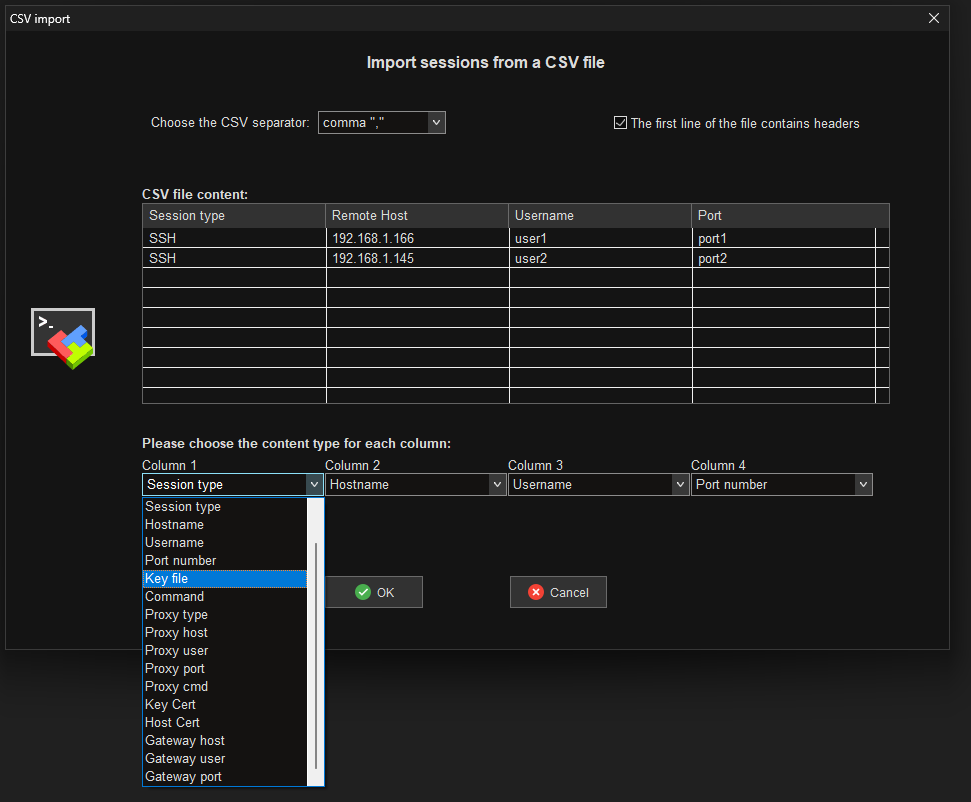
MobaXterm will automatically recognize the column type.
If needed you can reallocate the column to the requested parameters.
You can see a list of the supported parameter by expanding the column menu:
Note that, from the “Users sessions > Import sessions from third-party programs” menu, you can also choose to import the sessions saved in the others listed programs: